One of the standout home internet gadgets in the U.S. right now? The Arcadyan T-Mobile 5G Gateway, known as G4AR. Built specifically for T-Mobile Home Internet, caters to smaller businesses too – those needing easy start-up experience. Solid Wi-Fi strength comes standard. This device gives more freedom compared to run-of-the-mill routers you just plug in and forget. Where cable options are few or cost too much, this model steps in quietly but effectively. Users stuck on slow connections might find it fits their needs surprisingly well.
One thing sets this gateway apart: it mixes simple setup with tools serious users find useful. Not only does it support Wi-Fi 6, but also offers Gigabit Ethernet, a screen on the front, along with spots for outside antennas – making it stronger than typical ISP models. So while it keeps things straightforward, it doesn’t cut corners where performance matters.
Table of Contents
Understanding the G4AR
One gadget, the Arcadyan G4AR, links up to T-Mobile’s home internet using 5G across the United States. Instead of needing two boxes, this unit pulls in the signal while also sending it out – acting like a modem paired with a router. Because it does double duty, Wi-Fi or wired connections can reach phones, laptops, and more without extra gear nearby. Households skipping separate hardware find everything tucked into this one device.
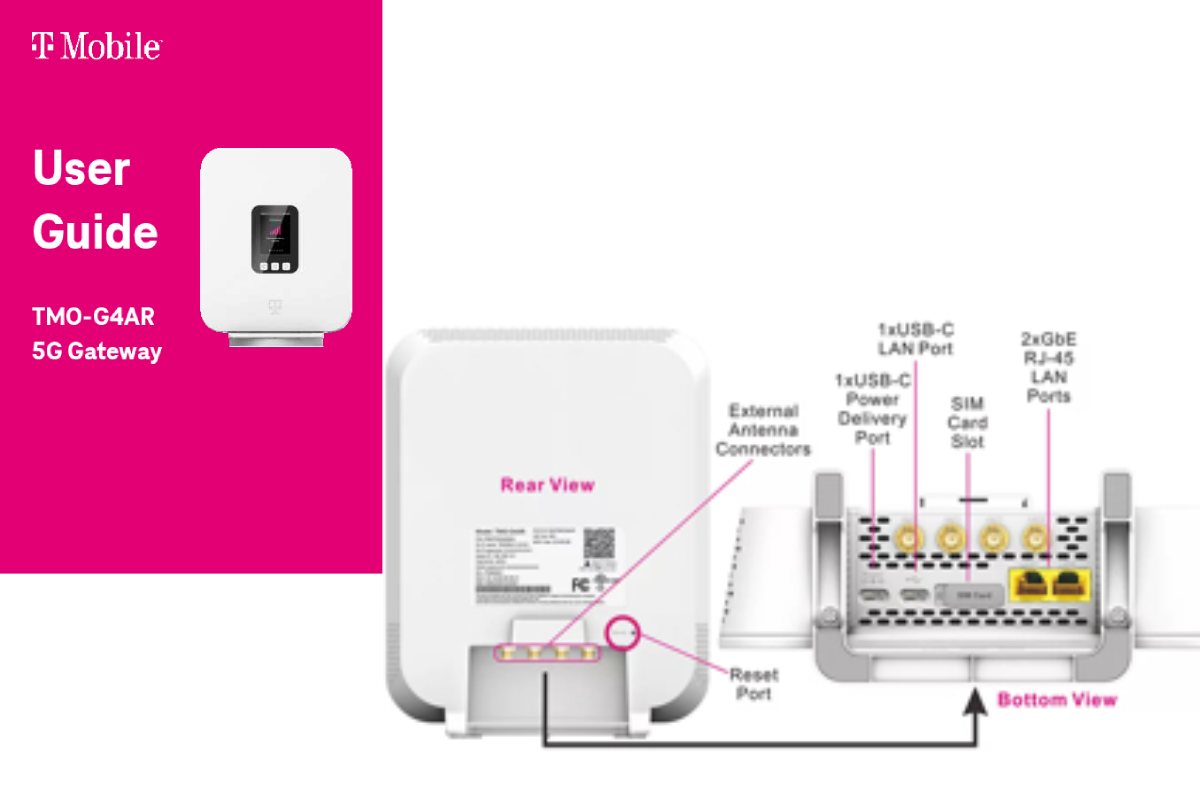
This device stands out since it works with T-Mobile’s main frequency ranges, the ones most responsible for delivering home internet through mid-band and lower signals across their 5G network. What helps even more? Four outside antenna connections are built in – useful when someone deals with weak reception or spotty service. Outskirts, distant towns, places where coverage fades… those spots often need every bit of reach they can get.
Main features
The G4AR is not flashy in appearance, but it is well-equipped for everyday use. It has a clean, compact design that fits easily on a shelf or desk, and the front display gives quick status information without needing to log into an app or browser every time. That display makes setup and signal testing much easier, especially when you are trying to find the best spot in the house.
It also includes Wi‑Fi 6, which is now a major advantage for homes with multiple connected devices. Wi‑Fi 6 can improve efficiency, reduce congestion, and help maintain a smoother connection when several phones, laptops, TVs, or smart home gadgets are online at once. For many U.S. households, that is a meaningful upgrade over older router technology.
Key specifications
The band support is important because it covers the spectrum most commonly used by T-Mobile for home internet in the U.S. The external antenna ports also give the G4AR a level of customization that many home internet gateways do not offer. That makes it appealing to users who are willing to tweak placement and reception to get better results.
Design and setup
The G4AR has a simple white rectangular design that looks modern and neutral, so it blends into most homes without drawing attention. The front display is one of the most practical parts of the device because it gives direct visual feedback about signal strength and network status. Instead of guessing whether the gateway is in a good spot, you can actually move it around and see whether the connection improves.
Setup is straightforward. You plug it in, let it connect to the T-Mobile network, and then connect your devices over Wi‑Fi or Ethernet. For most users, that process is quick and painless. For more advanced users, the real value comes later, when they start testing placement, checking signal quality, or adding antennas if needed.
Performance in real life
Out here, the G4AR starts to stand out. Specs look good enough for solid 5G at home, sure. But how well it works? That swings hard based on where you are. Your spot’s signal strength matters a lot. So does how packed the cell tower feels that day. Even where you set up the device indoors can change everything.
Most times, when the signal holds up well, the G4AR handles streaming, video chats, web surfing, buying things online, along with regular job tasks without trouble. Where reception dips, speeds might shift around – something often seen with home wireless setups using cell signals. Though the device itself works fine, its results depend heavily on how solid the local tower connection happens to be.
Most folks like how the G4AR lets them tweak things to get better results. When reception fades inside, shifting the device closer to a window often helps. Try lifting it onto a shelf or connecting an outside antenna instead. Some find relief just by adjusting where it sits – no need to accept poor coverage at floor level.
Performance summary chart
For most households, the G4AR works best as a practical internet gateway rather than a performance-tuning toy. If you are in a good T-Mobile coverage zone, it can be a very convenient home internet device. If your area has inconsistent service, the antenna support becomes more important.
Who should consider it
Home internet gets simpler with the G4AR when you skip cable or fiber setup. Renters might like it, since there is no wiring needed. Suburban homes could find steady use, particularly where T-Mobile coverage works well. Small businesses may rely on it either as main access or standby link. Rural residents gain options too, beyond what typical gateways offer.
Not every user will love how it performs when perfect reliability matters most. Since fixed wireless relies on cell signals, performance can shift with network quality. The G4AR isn’t flawed because of this. Just understand what the tech can actually deliver.
Pros and cons
The pros are especially appealing to users who want flexibility. The antenna ports, display, and Wi‑Fi 6 support make the G4AR feel more thoughtful than many basic ISP gateways. The downsides are mostly tied to the nature of cellular internet, not to the design of the device itself.
Comparison with a typical router
This comparison shows why the G4AR matters. It is not meant to replace every router on the market. It is meant to serve users who are already on T-Mobile’s 5G home internet or are considering it as a broadband alternative. For that group, the G4AR offers a practical mix of ease and flexibility.
Placement tips for better results
A spot near a window often works better for the G4AR. Higher shelves tend to boost reception in plenty of American households. The screen at the front lets people see changes right away. Trying new places becomes simple since feedback shows instantly. Location shifts can sharpen performance fast.
Out in spots where signals struggle, tossing up an outside antenna can beat simply shifting your router around. The G4AR grabs attention there – folks far from city hubs grab it often. They stop fighting dead zones, start shaping what reaches their devices.
Common user experience
Simple things win most of the time – that’s why folks like G4AR. Plug it in, and right away it just works, no tech background is needed. For those who tinker, extra tweaks sit waiting behind basic setup. Even if you skip the fine-tuning, it runs clean out of the box.
Most things either cut too much or add way too many parts. What stands out here is how it stays balanced. Not every device finds that middle ground where regular people feel comfortable using it. Right there, in the center, this one work just right.
Should you buy it?
Most folks on T-Mobile Home Internet across the U.S. find the G4AR works well. Signal adaptability matters? Then this device could fit right in. Need Wi-Fi 6 speed? That’s another reason to take a closer look. Outside antennas may boost performance – this box supports them too. Simplicity stays intact, even with extra settings available. Not overloaded yet gives room to tweak.
When wired internet works well at home, the G4AR might feel redundant. Yet should you prefer a wireless setup that installs without hassle yet allows tweaks later, this device makes sense. Flaws exist, true, yet its design stays functional, current, suited – ready to outperform simpler routers straight from day one.
FAQ
Is the Arcadyan G4AR good for home internet?
Yes. It is a practical option for T-Mobile Home Internet users in the U.S., especially in areas with decent 5G coverage.
Does the G4AR support Wi‑Fi 6?
Yes, it supports Wi‑Fi 6, which helps with efficiency and performance in busy homes.
Can you use external antennas with the G4AR?
Yes. The gateway includes four external antenna ports, which can help improve reception in weak-signal areas.
How many Ethernet ports does it have?
It has two Gigabit LAN ports.
Is it better than a regular router?
It depends on your setup. For T-Mobile cellular internet, it is a very useful gateway. For standard cable or fiber broadband, a regular router may be more appropriate.
Conclusion
One thing stands out about the Arcadyan T-Mobile 5G Gateway (G4AR): it fits neatly into American homes needing straightforward installation plus room to adapt. Built inside is Wi-Fi 6, space for outside antennas, a small screen that shows useful info, along with compatibility tied directly to T-Mobile’s 5G system – all packed into a tight shape. Because of this mix, those looking past standard internet hardware often find themselves drawn here.
Most of its power comes from how well it adjusts. A solid signal means it works right away, no fuss. When reception drops, there are still plenty of tweaks available – more than most similar gadgets offer. Those on T-Mobile Home Internet who like ease but also want choices will find the G4AR makes good sense.